
“.NET is a developer platform made up of tools, programming languages, and libraries for building many different types of applications.”
“Akka.NET” is an open source implementation of the “Akka” actor-model framework for building scalable, highly concurrent, distributed, and fault tolerant event-driven applications on .NET
“Mono” is an open source implementation of the .NET framework for cross-platform applications on Linux and MacOS.
“OWIN” (Open Web Interface for .NET) is an interface which if implemented on a Web server allows it to host .NET web applications.
These notes will illustrate how “Mono” and “OWIN” can be used to develop a “self-hosting” web application on the Linux platform.
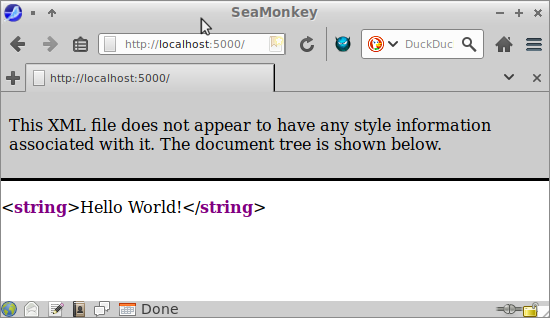
We shall be creating a very basic “Hello World” web application. The application will simply create an actor system and one top level actor. When the user navigates to the web application URL, a message is sent to the top level actor. The response sent back by the actor is then displayed by the web application.
Installation on Linux (Ubuntu 16.04)
1) Install Mono (https://www.mono-project.com/download/stable/#download-lin):
sudo apt-key adv --keyserver hkp://keyserver.ubuntu.com:80 --recv-keys 3FA7E0328081BFF6A14DA29AA6A19B38D3D831EF
sudo apt install apt-transport-https ca-certificates
echo "deb https://download.mono-project.com/repo/ubuntu stable-xenial main" | sudo tee /etc/apt/sources.list.d/mono-official-stable.list
sudo apt update
sudo apt install mono-devel
sudo apt install mono-complete
sudo apt install mono-dbg
sudo apt install mono-xsp4
sudo apt install monodevelop
sudo apt install nuget
2) Create a project using the MonoDevelop IDE:
Select File → New Solution →.NET → Console Project
Install the required packages:
3) Replace packages.config with the following (or install one using Project → Add NuGet Packages…):
packages.config
<?xml version="1.0" encoding="utf-8"?>
<packages>
    <package id="Akka" version="1.3.14" targetFramework="net47"/>
    <package id="Microsoft.AspNet.WebApi" version="5.2.7" targetFramework="net47"/>
    <package id="Microsoft.AspNet.WebApi.Client" version="5.2.7" targetFramework="net47"/>
    <package id="Microsoft.AspNet.WebApi.Core" version="5.2.7" targetFramework="net47"/>
    <package id="Microsoft.AspNet.WebApi.Owin" version="5.2.7" targetFramework="net47"/>
    <package id="Microsoft.AspNet.WebApi.OwinSelfHost" version="5.2.7" targetFramework="net47"/>
    <package id="Microsoft.AspNet.WebApi.WebHost" version="5.2.7" targetFramework="net47"/>
    <package id="Microsoft.Owin" version="4.0.1" targetFramework="net47"/>
    <package id="Microsoft.Owin.Host.HttpListener" version="4.0.1" targetFramework="net47"/>
    <package id="Microsoft.Owin.Host.SystemWeb" version="4.0.1" targetFramework="net47"/>
    <package id="Microsoft.Owin.Hosting" version="4.0.1" targetFramework="net47"/>
    <package id="Newtonsoft.Json" version="9.0.1" targetFramework="net47"/>
    <package id="Owin" version="1.0" targetFramework="net47"/>
    <package id="System.Collections.Immutable" version="1.5.0" targetFramework="net47"/>
</packages>
4) Replace Program.cs with the following:
Program.cs
using Microsoft.Owin.Hosting;
using System;

namespace HelloWorld
{
    class Program
    {
         static void Main(string[] args)
         {
              string baseUrl = "http://localhost:5000";
              using (WebApp.Start(baseUrl))
              {
                   Console.WriteLine("Press Enter to quit.");
                   Console.ReadKey();
              }
         }
    }
}
This code uses the Microsoft.Owin.Hosting package to start the program as a web application self-hosted at URL http://localhost:5000.
5) Add the following file to the project:
Startup.cs
using Akka.Actor;
using Microsoft.Owin;
using Owin;
using System.Web.Http;

[assembly: OwinStartup(typeof(HelloWorld.Startup))]

namespace HelloWorld
{
    public class Startup
    {
        public void Configuration(IAppBuilder app)
        {
            var actorSystem = ActorSystem.Create("webapi");
            var actorRef = actorSystem.ActorOf("WelcomeActor");
            var config = new HttpConfiguration();

            config.Routes.MapHttpRoute(
                "Default",
                "{controller}/{action}",
                new { controller = "Home", action = "Get" }
            );

            app.Use((context, next) =>
            {
                context.Environment["akka.actorsystem"] = actorSystem;
                return next();
            }).UseWebApi(config);
        }
    }
}
This code creates an Akka actor system called “webapi” and a top-level actor “WelcomeActor”. The actor system is assigned to the “akka.actorsystem” attribute of the OWIN configuration pipeline. A HttpRoute is also set up to map a default URL path to the “Get” action of the “Home” controller.
6) Add the following file to the project:
HomeController.cs
using Akka.Actor;
using System.Net.Http;
using System.Threading.Tasks;
using System.Web;
using System.Web.Http;

namespace HelloWorld.Web.Controllers
{
    public sealed class HomeController : ApiController
    {
        public HomeController()
        {
        }

        [HttpGet]

        public async Task<string> Get()
        {
            var actorSystem = Request.GetOwinContext().Get<ActorSystem>("akka.actorsystem");
            var welcomeActor = actorSystem.ActorSelection("/user/WelcomeActor");
            var response = await welcomeActor.Ask<string>(new Messages.Hello());

            return response;
        }
    }
}
In response to a “Get” action, this controller retrieves the actor system stored previously in the OWIN configuration and gets a reference to the “WelcomeActor” actor object. The code then sends an asynchronous message to the actor and awaits a response which is then returned as the “Get” reply.
In this example the message sent is as follows:
Hello.cs
namespace HelloWorld.Messages
{
    public sealed class Hello
    {
        public Hello()
        {
        }
    }
}
The “WelcomeActor” is as follows:
WelcomeActor.cs
using Akka.Actor;

namespace HelloWorld.Actors
{
    public class WelcomeActor : ReceiveActor
    {
        public WelcomeActor()
        {
            Receive<HelloWorld.Messages.Hello>(x =>
            {
                Context.Sender.Tell("Hello World!");
            });
        }
    }
}
The “WelcomeActor” is setup as a “ReceiveActor” with a method to receive objects of type “Hello”.
For such messages the receive method simply sends the text “Hello World!” back to the sending object.
Test
In the MonoDevelop IDE, build and run the project from the Build and Run menus.
To test enter the URL http://localhost:5000 into a web browser.
You should see something like this: